


AInvest: AI Stocks & Investing
4.5178.00 Reviews
App Specs
- Version
- 5.1.3.0
- Updated On
- License
- Free
- Downloads
- 100,000+
- Developer
- AInvest Fintech, Inc.
- Categories
- Finance
- Platform
- Android
Screenshots

 Analysis by AppCompare
I tend to judge a finance app by what happens when I need it quickly, not just by how polished it looks on a quiet afternoon. With AInvest: AI Invests & Trades, the experience is closely tied to an internet connection: market information, news, screening and simulated investing are most useful when the app can reach current services. That makes it better suited to checking and researching than to treating a phone as a complete, always-available trading setup.
When a live connection changes the experience
AInvest brings stock discovery, finance news and a simulator together, so a connected session can move naturally from “what is happening?” to “how might I respond?” I find that useful when I want to look into a company after seeing a headline, rather than switching between a news app, a screening tool and a separate practice account. The trade-off is that these activities depend on fresh information; if a connection is slow or interrupted, I would avoid treating an old screen as a reliable picture of the market.
For a practical routine, I’d use the app in two passes. First, scan the news or screening results and note a small number of stocks worth investigating. Then, use the simulator to explore an idea before making any real-money decision elsewhere. This separation helps keep a quick market check from turning into an impulsive trade, and it makes the simulated activity a learning aid rather than proof that a strategy will work in live conditions.
Useful in short mobile sessions
The phone format makes the most sense for brief checks between other tasks: reviewing a headline during a commute, saving a stock idea mentally for later, or using a quiet moment to learn how a hypothetical trade might behave. AInvest is a finance app from AInvest Fintech, Inc., and its focus on stock research and practice gives those short sessions more purpose than simply watching prices move. I would still reserve detailed comparisons and decisions for a moment when I can concentrate; small screens make it easy to skim a headline without noticing the context around it.
One useful habit is to arrive with a question. For example, instead of browsing indefinitely, ask whether a company deserves more research, whether a market story affects a particular sector, or how a simulated position changes when the assumption changes. This makes the combination of screening, news and simulation feel like a workflow rather than a stream of prompts. It also reduces the risk of confusing a stock that appears in a screen with one that automatically fits your needs.
What to do when the connection falters
Connectivity problems matter more in a finance app than in a casual reading app because market context can change while a device is offline or reconnecting. If a screen appears stuck, I would refresh only after checking the connection, then verify the information before acting on it. A failed load is an inconvenience; a decision based on stale context can be much more serious. I wouldn’t rely on the app as the sole channel for time-sensitive trading or assume that a simulated result reflects what could happen in a live market.
That cautious approach also helps separate app trouble from market uncertainty. If a result seems surprising, check the company and the reasoning behind the idea rather than repeatedly tapping through screens. A stock screener can narrow a broad field, but it cannot replace reading, independent judgement or an understanding of risk. For someone who needs dependable order handling above all else, a dedicated brokerage app may be a more suitable primary tool, with AInvest serving as a research companion.
Worth Reading Before You Choose

EA SPORTS FC Mobile 26 Is a Bigger Football Game, but It Takes Time

Flipboard Shows What News Apps Must Do Beyond the Feed

Switching to Android Auto Means Rethinking Your Driving Routine

Google Calendar Makes a Crowded Week Easier to Manage

Ludo King Makes the Most of the Minutes Between Plans

Baby Panda World Brings Quick Play to Modern Phones, but Its Game Library Feels Busy
Keeping mobile data use intentional
Because the app brings together market-related material and news, I’d use it deliberately rather than leave it open as a constant feed. A short scheduled check is often more useful than repeatedly refreshing throughout the day, especially for someone investing with a longer time horizon. If mobile data is limited, browse only when you have a clear task and use a trusted Wi-Fi connection when convenient. I wouldn’t assume that every screen or feature behaves the same way without a connection.
It is also worth deciding in advance what would count as a reason to take action. A headline can feel urgent on a phone, even when it is only one piece of a much larger story. I’d treat the app’s news and AI-assisted discovery as starting points for research, not personalized financial certainty. That mindset makes the tools more useful and keeps the convenience of mobile access from encouraging decisions made in a rush.
Getting Started with AInvest
So, diving right in, downloading AInvest was a breeze. Available on both Android and iOS, it takes just a few taps to get it up and running. Once you’re in, the app greets you with a sleek interface that’s both intuitive and easy on the eyes. No clutter, just clean lines and straightforward menus that make navigation a cinch.
Setting up your profile is as simple as pie. You’ll be prompted to enter some basic info, and just like that, you’re ready to explore the world of AI-driven investing. The app offers a demo mode too, which I found super handy for getting the hang of things without risking any real dough.
Features That Stand Out
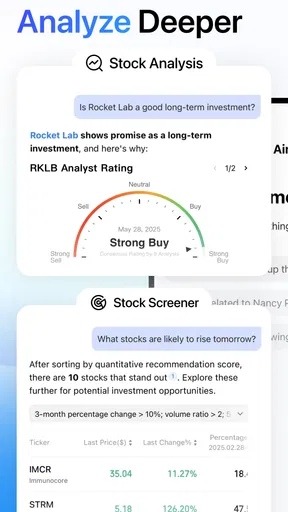
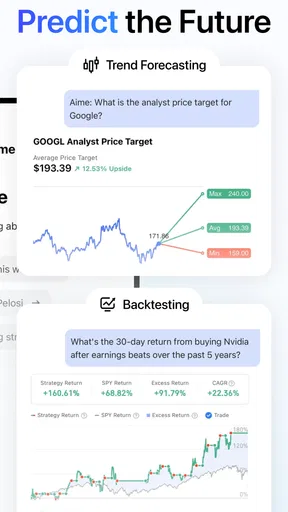
Now, let’s talk about what makes AInvest tick. The app is powered by advanced AI algorithms that analyze market trends and data, offering tailored investment advice. It’s like having a little Wall Street whiz kid in your phone, minus the caffeine jitters.
One feature I particularly loved is the personalized portfolio management. The app assesses your risk tolerance, investment goals, and current market conditions to suggest a portfolio that’s just right for you. It’s like having a bespoke suit tailored perfectly to your financial figure.
There’s also a neat real-time trading feature, which allows you to buy and sell stocks directly through the app. It’s fast, efficient, and ideal for those of us who like to strike while the iron’s hot. Plus, the app provides detailed analytics and reports, giving you insights into your investments’ performance at the tap of a screen.
User Experience: A Smooth Ride
Let’s face it, not all of us are financial wizards. But with AInvest, you don’t have to be. The app’s user-friendly design ensures that even a newbie can find their way around without a hitch. The learning curve is gentle, which is perfect if you’re just dipping your toes into the investment waters.
What I found particularly charming was the in-app tutorials and guides. They’re not just dry text, but engaging and interactive, making learning about investments almost fun. Who knew financial literacy could be this accessible?
Security: Because Your Money Matters
Of course, when it comes to handling your hard-earned cash, security is paramount. AInvest doesn’t skimp on this front, offering top-notch encryption and security protocols to keep your data safe and sound. The app also supports biometric authentication, so only you can access your account.
Trust is key in the financial world, and AInvest seems to understand that well. Their customer support is responsive and knowledgeable, ready to assist with any queries or concerns you might have.
Choosing the right role for the app
AInvest is free to download, rated for Everyone, and has an average rating of 4.5 from 873 ratings, with 172 written reviews. It has passed 50K+ installs, and its current version is 5.0.3.0; the app first appeared on Aug 25, 2021, and requires Android 8.0 or later. Those figures give a sense of its reach, but they don’t tell me whether its approach will suit a particular investor. I’d choose it for a blend of stock research, news and low-stakes practice, not as a substitute for understanding what I’m buying.
The simulator is especially useful for someone learning how orders and market moves can affect a position, or for an experienced investor who wants to test an idea without immediately committing money. A concrete routine might be checking a company’s news during lunch, using a screen to find related candidates, and later trying a hypothetical position in the simulator. The key is to write down why the idea looked interesting before checking the simulated result; otherwise, it is easy to judge a strategy only by whether one short example happened to go well.
Where it differs from other finance apps
Compared with a brokerage app built mainly around account balances, order entry and holdings, AInvest puts more emphasis on discovery and learning. Compared with a general finance-news app, it gives stock exploration and simulated investing a more central place. That mix is a real advantage for a curious user who wants to investigate an idea in one place. It can also feel like too much if all you need is a clean list of investments or a dependable tool for placing orders.
I’d keep the roles distinct: use AInvest to generate questions and practice a process, then verify important details through sources you trust before making a real decision. AI-generated suggestions can help organize research, but they should not be mistaken for a guarantee or a personal adviser who understands every part of your finances. Anyone looking for a simple long-term portfolio tracker may prefer a less discovery-focused tool; someone who trades actively may prioritize a brokerage service with the precise account and order features they rely on.
Costs, expectations and a sensible first run
The app is free, but it offers in-app purchases ranging from $2.99 to $699.99 per item. I’d explore the free experience first and make sure I understand what any purchase unlocks before paying. That range is broad enough that it is worth checking the specific item and its value to your own routine rather than assuming every useful function requires an upgrade—or that a purchase will improve investment outcomes.
For a first session, I’d avoid trying every tool at once. Pick one company you already know, read the related material, see what the screener helps you notice, and then use the simulator to test a clearly stated hypothetical. That gives you a grounded sense of whether the app’s combination of AI-assisted research and practice is genuinely helpful. It also exposes a limitation early: if you prefer a quiet, minimal interface with no encouragement to explore more stocks, this app’s broader toolkit may not match your style.
Final Thoughts
In a nutshell, AInvest: AI Invests & Trades is a solid choice for both seasoned investors and newbies alike. It brings the power of AI to the palm of your hand, making investing more accessible and less intimidating. Whether you’re looking to manage your portfolio like a pro or simply want to dip your toes into trading, AInvest has got you covered.
So, if you’re ready to embark on your investment journey with a trusty AI sidekick, give AInvest a try. Who knows? It might just be the financial wingman you’ve been searching for.
My connectivity verdict
For me, the strongest reason to try AInvest is the way research, news and practice can sit together in a connected mobile session. The main caution is equally clear: don’t let quick access turn a screen into a command to trade, and don’t act on information that may have failed to refresh. If you want a learning-oriented stock tool and are comfortable checking your assumptions, it is worth exploring. If your priority is a straightforward portfolio view or a dedicated place to execute time-sensitive orders, another finance app may fit better.
Pros
- User-friendly interface for easy navigation.
- Real-time market data for informed decisions.
- AI-driven insights enhance investment strategies.
- Customizable alerts for market changes.
- Supports multiple asset classes.
Cons
- Requires a stable internet connection.
- Subscription needed for premium features.
- Limited support for niche markets.
- AI predictions can be inconsistent.
- Complex for beginners without finance background.
FAQs for AInvest: AI Stocks & Investing
What is AInvest: AI Invests & Trades and how does it work?
AInvest: AI Invests & Trades is an innovative app that utilizes artificial intelligence to help users make informed investment and trading decisions. The app analyzes market trends, financial news, and historical data to provide personalized insights and strategies. Users can leverage these insights to optimize their portfolio and enhance their trading performance.
Is AInvest suitable for beginners in trading and investing?
Yes, AInvest is designed to cater to both beginners and seasoned investors. The app offers a user-friendly interface with educational resources to help newcomers understand the basics of investing and trading. Additionally, the AI-driven insights simplify complex data, making it easier for beginners to make informed decisions without needing extensive market knowledge.
What features does AInvest offer to enhance trading and investing?
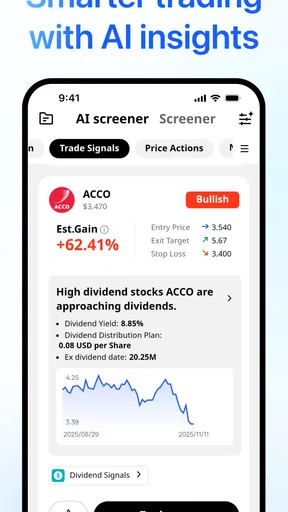
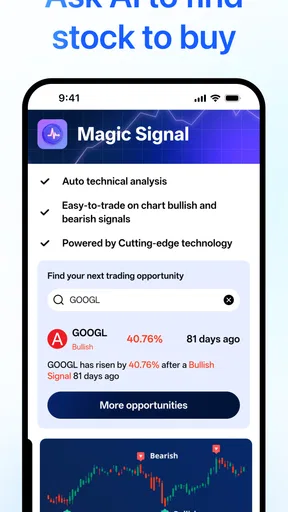
AInvest offers a range of features including real-time market analysis, personalized investment strategies, risk management tools, and portfolio tracking. The app also provides alerts and notifications for market changes, helping users stay informed. Its AI-driven algorithms are continuously updated, ensuring that users receive the latest and most relevant insights.
Is AInvest secure and how does it protect user data?
AInvest prioritizes user security with robust encryption protocols to protect personal and financial information. The app adheres to industry standards for data privacy and utilizes secure authentication methods to ensure that only authorized users can access accounts. Regular security audits further enhance the protection of user data.
Are there any costs associated with using AInvest?
AInvest may offer a free version with basic features, but advanced features might require a subscription or in-app purchases. It's important to check the app's pricing structure on the download page for details on any costs. Users can choose a plan that best suits their investment needs and budget.


